
Advanced Scheduling Rules
Automatically manage capacity, merging, and priority when self-scheduling reservation bookings
The Waitlist Me self-scheduling features make it easy for customers to add themselves to the waitlist and send reservation requests, and there are several settings for customizing these features to the goals of the businesses using them.
The Advanced Scheduling Rules are designed to help users on Platinum subscriptions that are using table management features to more effectively automate the self-scheduling of reservations. These rules provide more control over how the business would like the tables to be assigned so that their customers can check availability and self-schedule, and the Waitlist Me system can automatically assign customers to the appropriate available tables as well as prevent double bookings.
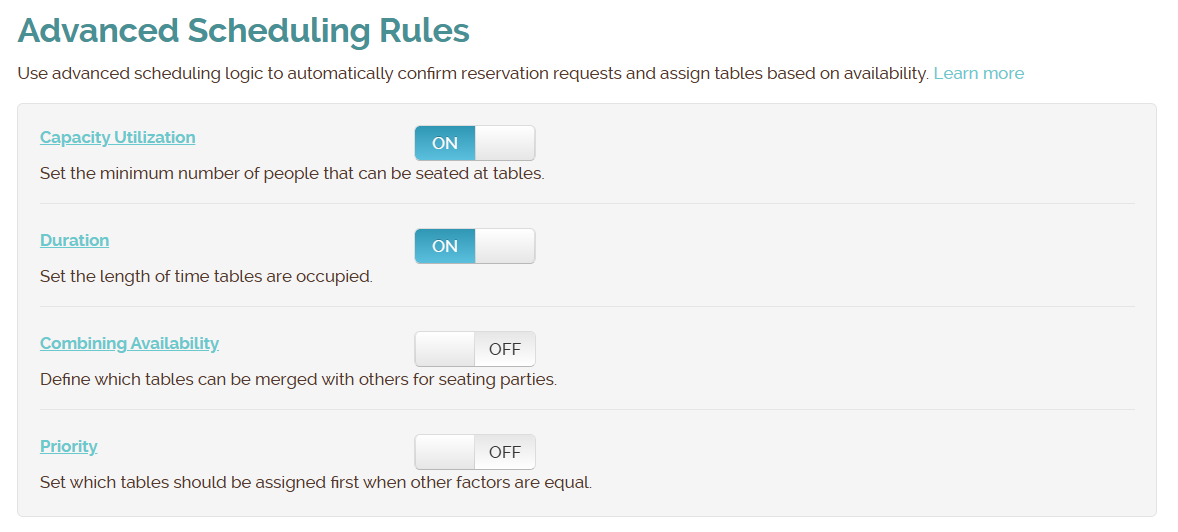
Here is more on how the rules work, and they can be toggled on or off based on the needs of the business:
- Capacity Utilization - Set the minimum number of people that can be seated at tables to avoid smaller groups being seated at larger tables. For example, if you have a table of 8, you might could set the minimum party size to 5 or 6, so it wouldn't be considered for availability for smaller party sizes.
- Duration - Set the duration of time that parties occupy tables. You can have the same duration for all parties or vary it by group size. You can also have different durations for different days and times of days by creating rules and linking the rules to your business hour schedule.
- Merging Tables - Define which tables can be merged with others for seating parties. For example, if there was a party of 4 and no tables large enough available for that party, you might merge two tables for 2 to accommodate the group if the tables were close to each other.
- Priority - Set which tables should be assigned first when other factors are equal. For example, if you have popular tables you could put them higher in priority if you'd like them to be filled first or lower in priority if you'd like to hold them to give out to people that might request them. You can also use priority to order tables to be given out first if you want to spread out or concentrate the ones that are scheduled automatically.
For more details and example scenarios on how these features work, check out the following links: